

Disclosure: This post contains affiliate links. If you sign up through my link, I may earn a commission at no extra cost to you. Bluehost is also paying me to create content about Bluehost AI Builder, but every opinion and result below comes from my own build.
Quick Answer
Bluehost AI Builder lets you describe the website or web app your business needs, refine it by chatting, and publish it live. It’s $0 to start, no credit card, and paid plans start from $20/mo. I tested it by building EduKester, a business directory for Nigeria, and it took me about 17 minutes from my first prompt to a live site. Below I show exactly what I did, what worked, what didn’t, and what it costs.
Try Bluehost AI Builder here
| Quick facts | Details |
|---|---|
| What I built | A business directory website for Nigeria (EduKester) |
| Time to first version | About 7 minutes |
| Total time to a live site | About 17 minutes, including changes and publishing |
| Cost to start | $0 to start, no credit card |
| Free plan credits | 5 a day, up to 30 a month |
| Custom domain | Needs a paid plan (paid plans from $20/mo) |
| Support | 24/7 human support, including on the Free plan |
Table of Contents
- What is Bluehost AI Builder?
- Why I decided to test it
- How I built my site, step by step
- What can you build with Bluehost AI Builder?
- What I liked
- What could be better
- Bluehost AI Builder pricing and credits
- Can a Bluehost AI Builder site show up on Google?
- Who it is best for, and who should look elsewhere
- Tips to get better results
- My verdict
- FAQ
What Is Bluehost AI Builder?
Bluehost AI Builder is a tool that builds a website or web app from a plain-English description. You tell it what your business needs. It creates a first version, you change things by chatting with it, and when you’re happy, you publish it live. Hosting is included, so your builder and your hosting live in one place.
Here is what makes it different from the drag-and-drop builders I’ve used before:
- You start with words, not templates. Instead of scrolling through hundreds of themes, you just say what you want. You can also add your logo, your photos, or a site you like as a design reference.
- You refine by chatting. If something isn’t right, you tell it what to fix, the same way you would tell a designer.
- It’s free to start. The price is $0 to start, no credit card, so you can build something real before you spend anything.
That last point matters. Many reviews of AI website builders are based on a quick demo. Because Bluehost AI Builder is free to try, I built a real project, and this review is based on that.
One honest note: Bluehost currently labels it “Early Access,” so features and limits may change. Always check the official page before you buy.
Why I Decided to Test Bluehost AI Builder
I’m a freelancer, WordPress website designer, SEO expert, and affiliate marketer. I’ve built websites for years, and the slowest part has always been the first draft: staring at a blank page, picking a layout, and writing placeholder text in Elementor. When Bluehost invited me to try Bluehost AI Builder, I wanted to know one thing: can it get me from idea to a live site faster than I can do it myself?
I also wanted to answer the questions I keep getting from readers:
- Is an AI website builder good enough for a real business, or is it just a toy?
- Can a beginner use it without any coding or design skills?
- What do you actually get for $0?
So I opened a new account and gave myself one rule: build something I would be willing to show to a real customer.
How I Built My Website With Bluehost AI Builder (Step by Step)
Step 1: I Described My Website in a Prompt
I started at the Bluehost AI Builder page and typed my idea into the prompt box. You can start with just one sentence, but I wanted to test how well it handles a detailed brief, so I wrote a long one. This is exactly what I wrote:
You are a senior full-stack developer and UX designer. Build a professional, mobile-first business directory and listing website for Nigeria called “[edukester]” (e.g. NaijaConnect), where people can find trusted businesses and essential services near them.
CATEGORIES
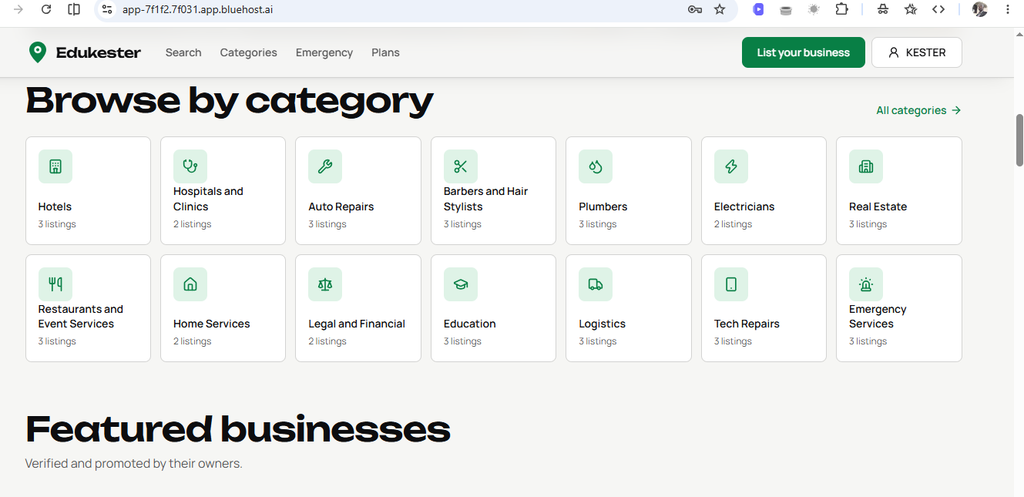
Hotels, Hospitals and Clinics, Auto Repairs, Barbers and Hair Stylists, Plumbers, Electricians, Real Estate, Restaurants and Event Services, Home Services (cleaners, painters, AC repair), Legal and Financial, Education, Logistics, Tech Repairs, and Emergency Services (police, FRSC, fire, ambulance). Categories should be editable from the admin panel.USER FEATURES
- Search with autocomplete, plus filters for category, State, LGA/city, rating, verified status, and open now
- “Near me” search with a map view
- Listing page: photos, description, services, hours, address, map, reviews and ratings
- One-tap Call and WhatsApp buttons (+234 format)
- Reviews, favorites, and user accounts (email, phone OTP, Google login)
BUSINESS FEATURES
- Register, add or claim a listing, and manage it from a dashboard
- Upload photos, set hours, reply to reviews, view stats (views, calls, leads)
- Verified badge and paid plans (Free, Premium, Featured) via Paystack
ADMIN PANEL
- Approve or reject listings, manage categories, users, reviews, and reports
- Manage featured placements and bulk import listings via CSV
NIGERIA-SPECIFIC
- Pre-load all 36 States + FCT and their LGAs
- Naira (₦) formatting and Nigerian phone validation, etc
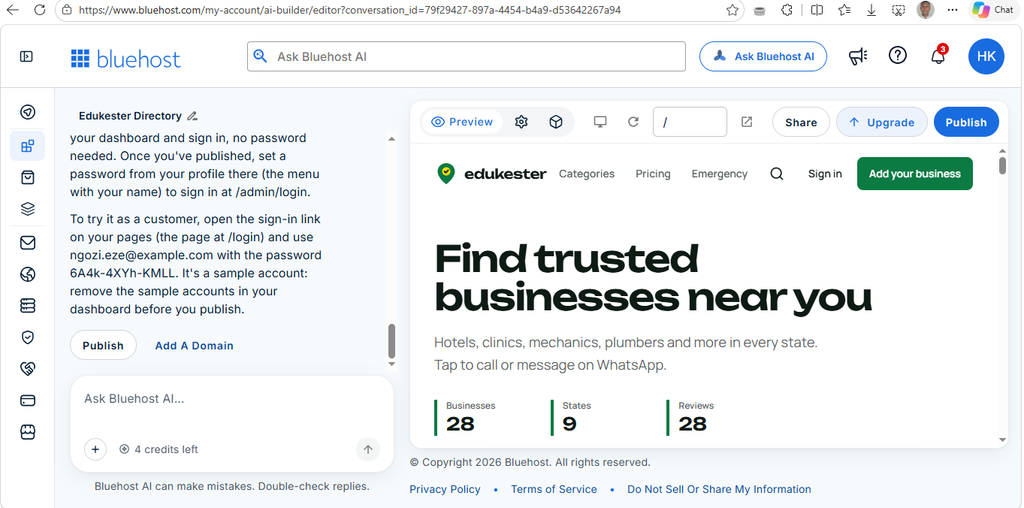
The sign-up was quick. It took me about 7 minutes to get going, and that was with a slow network, so yours may be faster. Some hosting companies say “$0” and then ask for your credit or debit card during sign-up. Bluehost did not ask me for one, and the sign-up was straightforward. The prompt box is right in front of you, so there is nothing to hunt for. In fact, there are two of them on the homepage.
You ccan watch the video Step by step guide also or continue reading the post.
Step 2: I Reviewed the First Version
After I submitted my prompt, Bluehost AI Builder asked me a few quick questions about my profession and what I wanted, and I picked the options that fit. Bluehost says these clarifying questions don’t use any of your credits. Then it started building, and in about 7 minutes I had a complete first version with all the sections I described in my prompt.
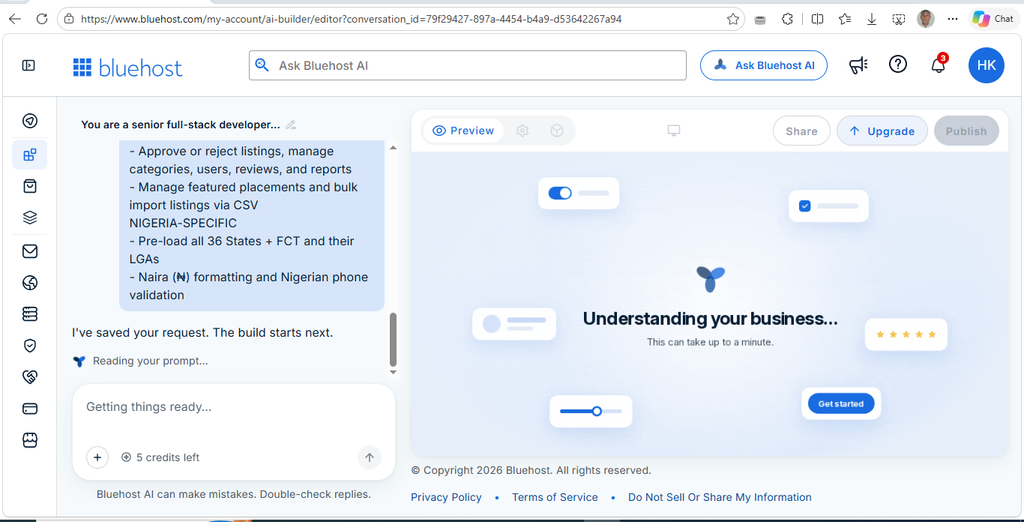
My honest first reaction: I was amazed. I’m a professional web designer, so I looked at it with a critical eye. The design was very good. I only wanted a small adjustment in the hero section to make it better, and I think that was down to my prompt, not the tool.
Step 3: I Refined the Site by Chatting
This is the part I was most curious about. Instead of dragging boxes around, I told the AI what to change. I sent one simple message:
The hero text should be in the center.
That was all it took, and the hero section was exactly how I wanted it.
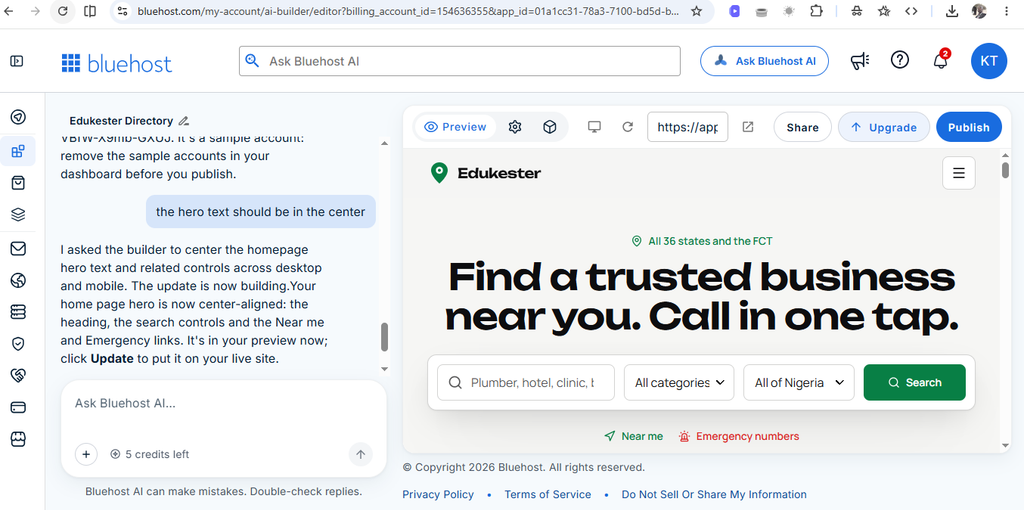
After that I checked the whole site and found no issues. It was responsive on mobile, the animations worked the way they were supposed to, and I was happy with the result.
Step 4: I Published It Live
When I was happy with the result, I published the site. Going live took about 10 minutes. The free web address has a mix of letters and numbers in it. There is also an option to connect your own domain, but that asks you to upgrade to a monthly or yearly plan. As a starter, you can simply use the address that Bluehost AI Builder gives you.
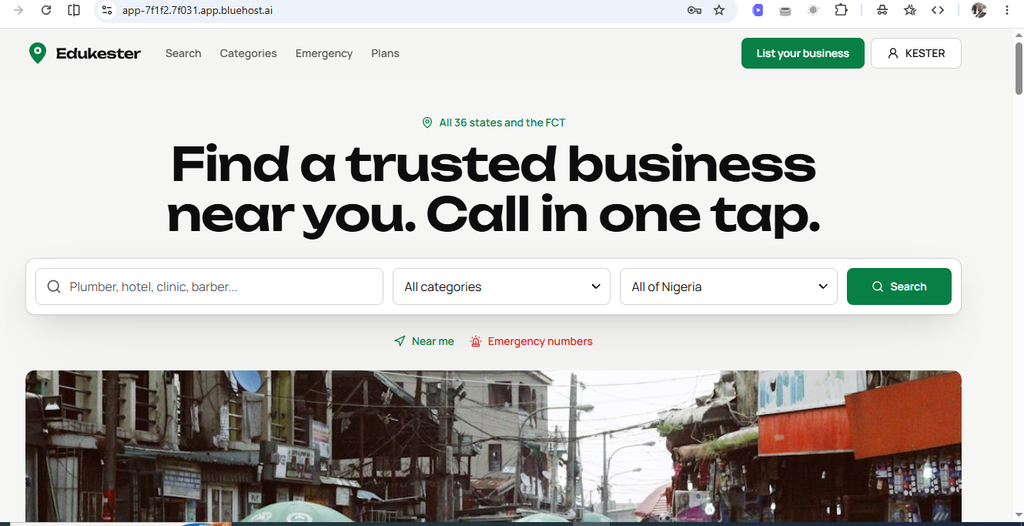
Total time from my first prompt to a live site: about 17 minutes. Your time will depend on your network and how much you customize.
You can see my live results here: https://app-7f1f2.7f031.app.bluehost.ai/ and https://app-b8059.ea428.app.bluehost.ai/
What Can You Build With Bluehost AI Builder?
My directory is one example, but Bluehost says you can build many kinds of websites and web apps without writing code. According to the official page, that includes:
- Websites: business sites, portfolios, landing pages, and blogs
- Booking sites with scheduling
- Customer portals with user accounts and roles
- Quote request forms with an admin panel and email alerts
- Directories like the one I built
- Internal tools for your team
One limit to know about: it builds websites and web apps that open in a browser on phones, tablets, and computers. It does not build native apps for the Apple App Store or Google Play at this time.
What I Liked About Bluehost AI Builder
Here is what stood out to me after building a real site:
- The prompt removes the blank page problem. I didn’t have to pick a template or plan a layout. I described my business and had something to react to. Editing a draft is much easier than starting from nothing.
- Chatting to make changes feels natural. If you can write a text message, you can use this. I described what I wanted based on my needs, and I got the result I asked for.
- It’s genuinely free to start. I didn’t need a credit card to try it, so you can test it before spending anything.
- It goes all the way to publishing. Many AI tools give you a pretty preview and then leave you to figure out the rest. With Bluehost AI Builder, hosting and publishing are part of the same flow.
- Everything was linked together. This is what I liked the most. A simple prompt gave me what I wanted. I did not need to drag and drop or build page after page from a blank screen, and every page was connected properly, with no dead ends.
- Human support is included. Bluehost says 24/7 human support comes with every plan, including the Free plan.
What Could Be Better
No tool is perfect, and I would rather you hear the downsides from me than discover them later.
- Connecting your own domain needs a paid plan. If you already bought a domain somewhere else, I think connecting it should be free. Right now, the Free plan publishes on a Bluehost address, and your own domain needs a paid plan.
- The default web address is not pretty. It is a long mix of letters and numbers. It is fine for testing, but it is not a brand-friendly URL.
- The free plan has limits. You get 5 credits a day, up to 30 a month, so a big project may take you a few days on the Free plan.
- The first draft still needs your eyes. Like any AI tool, the text it writes is a starting point. Read every line and change anything that doesn’t match your business.
Bluehost AI Builder Pricing and Credits
Here is how pricing works, based on the official Bluehost AI Builder page when I checked it:
| Plan | Price | Credits | Good for |
|---|---|---|---|
| Free | $0 to start, no credit card | 5 a day, up to 30 a month | Trying it out and going live fast |
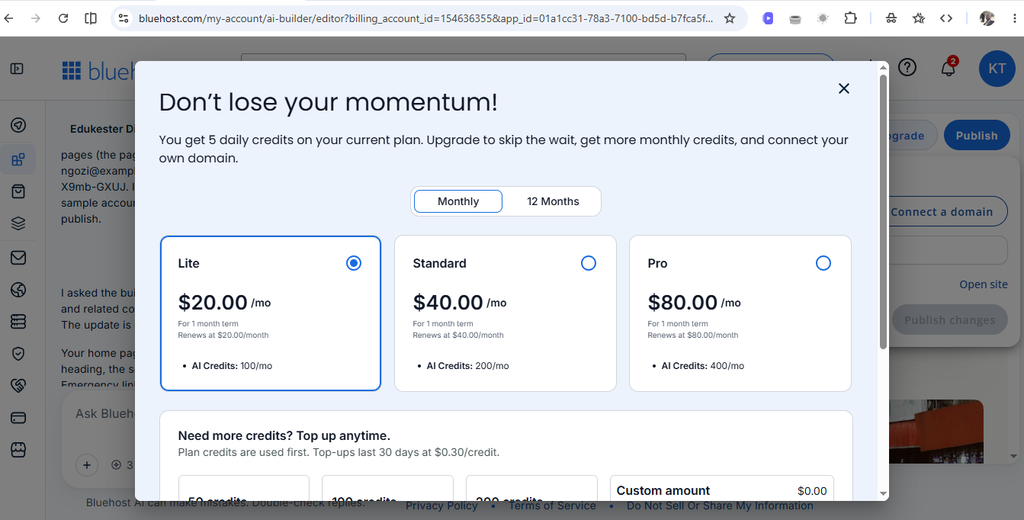
| Lite | $20/mo | Up to 100 a month | Taking a first site or app live on your own domain |
| Standard | $40/mo | 200 a month | Businesses that build and update often |
Every plan includes hosting, 24/7 human support, and unlimited websites and apps. Lite and Standard add custom domains, and Lite also lets you remove the Bluehost badge and buy extra credits.
Here is how credits work in plain English:
- One message that builds or changes your site uses one credit.
- The AI’s clarifying questions are free.
- Hosting never uses your credits.
- If you run out of credits, your live site stays online. You just can’t make new changes until you top up or your credits refresh.
- Monthly plan credits and top-ups expire after 30 days.
My opinion: Lite at $20/mo is fair if you want your own domain, because you get the AI builder, hosting, and human support in one plan. If all you need is cheap hosting for a site you already have, a regular hosting plan will cost less. But for going from idea to live site fast, the price makes sense to me. Domain registration and renewal are separate from connecting a domain you already own, so check the terms before you buy a domain.
Plans can change, so always check the current details on the Bluehost AI Builder page before you buy.
Can a Bluehost AI Builder Site Show Up on Google?
I’m an SEO person, so I checked this carefully. Bluehost says Bluehost AI Builder writes real content for every page and automatically adds page titles, descriptions, headings, and image alt text. Every site is also mobile-responsive. Those are the basics Google looks for.
But no builder can promise rankings. Where you rank depends on your content, your location, and your competition. Here is what I would do if I wanted real search traffic:
- Use your own domain. A free Bluehost address is great for testing, but a custom domain (paid plans only) is better for building a brand that people can find and remember.
- Do keyword research and write your page content around what people actually search for.
- Edit the titles and descriptions so each page clearly says what it offers.
- Add real photos and descriptive alt text.
- Check your site on mobile and test every page before you promote it.
Who Is Bluehost AI Builder Best For?
Based on my build, I would recommend it to:
- Small business owners who need a professional online presence fast and don’t have a big budget.
- Freelancers and consultants who want a simple site to show their services.
- Beginners who have never built a website and feel nervous about design or code.
- Anyone with a new idea who wants to test it online before investing real money.
- Busy people who would rather describe a site than spend a weekend building one.
Who Should Look Elsewhere?
Bluehost AI Builder may not be the right fit if:
- You need pixel-perfect control over every detail of a highly custom design.
- You specifically want to manage your site in WordPress. Bluehost has a separate WordPress AI Builder for that.
- You need a native mobile app for the App Store or Google Play.
- You already have a site you love and don’t need a new one.
7 Tips to Get Better Results From Bluehost AI Builder
Here is what I learned that you can use right away:
- Be specific in your first prompt. Include what your business does, who it’s for, and where it operates. “A website for a family-run bakery in Abuja that takes custom cake orders” beats “a bakery website.”
- Don’t be afraid of a long prompt. Mine was detailed, and the first version already included every section I asked for.
- Change one thing at a time. Small, clear requests give better results than big, messy ones. Remember that each message uses a credit.
- Say what you want, not just what you don’t. “Make the homepage warmer and friendlier” works better than “I don’t like this.”
- Rewrite the text in your own voice. Visitors can tell when copy is generic. Make it yours.
- Check every page on your phone. Most of your visitors will probably arrive on mobile.
- Read everything before you publish. Check names, prices, contact details, and claims for accuracy.
Frequently Asked Questions
What is Bluehost AI Builder?
Bluehost AI Builder is a tool that creates a website or web app from a plain-language description of what your business needs. You refine the result by chatting with the AI, then publish it live.
How much does Bluehost AI Builder cost?
It’s $0 to start, no credit card. Paid plans start from $20/mo (Lite), with a Standard plan at $40/mo for more monthly credits.
Do I need a credit card to try Bluehost AI Builder?
No. You can start for free without a credit card. In my sign-up, Bluehost did not ask for card details.
Do I need coding or design skills to use Bluehost AI Builder?
No. You describe what you want in plain English and refine it by chatting. You can change the parts you don’t like and keep the parts you do, and you end up with a modern, professional-looking website.
Can I publish my website live with Bluehost AI Builder?
Yes. I published my own build and you can see it live above. The Free plan publishes on a Bluehost address.
Can I use my own domain?
Yes, but you need a paid plan. The Free plan publishes on a Bluehost address, and paid plans let you connect a domain you already own.
How do credits work?
One message that builds or changes your site uses one credit. The AI’s clarifying questions, publishing, and hosting don’t use credits. If you run out, your live site stays online, and only new changes pause.
Can I build a web app, not just a website?
Yes. Bluehost says you can build web apps such as booking sites, customer portals, quote request forms, directories, and internal tools. They open in a browser, and they are not native App Store or Google Play apps.
How long does it take to build a website with Bluehost AI Builder?
My build took about 17 minutes from first prompt to live site: around 7 minutes to get the first version, and around 10 more for changes and publishing. Your time will depend on your network and how much you customize.
Can a Bluehost AI Builder website rank on Google?
Bluehost AI Builder adds page titles, descriptions, headings, and image alt text, and every site is mobile-responsive. Rankings still depend on your content, location, and competition, so no builder can guarantee a position.
Is Bluehost AI Builder good for small businesses?
In my experience, yes. Many people want to launch a business but feel blocked by cost or technical skills. Bluehost AI Builder lowers that barrier, and the free start means you can test your idea first.
What if I want a WordPress site?
Bluehost has a separate Bluehost WordPress AI Builder that comes with WordPress hosting plans. Bluehost AI Builder is for people who want to describe what they need and let the AI handle the rest with no WordPress knowledge.
My Conclusion: Is Bluehost AI Builder Worth Trying?
Yes. It helped me launch a full business directory in about 17 minutes. Making changes was simple, and the design looked modern and professional.
After building EduKester from a single prompt, my answer is that Bluehost AI Builder is a great tool for getting a first version live fast. It saved me time and the energy I would normally spend on fonts, drag and drop, and adjusting elements. It is not perfect, because you can’t connect your own domain until you pay for a plan. But for anyone who wants to launch an idea for free and see it live quickly, it is a very good place to start.
In my own tests with another AI builder, my project ran out of credits before it was finished, and you can see that unfinished attempt here: https://nigerian-business-di-ee01.bolt.host. That was my experience, and it can differ depending on the plan you use. The subscription I looked at there was $25 per month, compared with paid plans from $20/mo on Bluehost AI Builder. With Bluehost AI Builder, I built two websites and still had credits left. Whichever tool you choose, compare the credit limits and what each plan includes.
The best part is that you don’t have to take my word for it. It’s $0 to start, no credit card, so you can build your own site and judge it yourself.
Start building with Bluehost AI Builder
Affiliate disclosure: This post contains affiliate links and is part of a paid partnership with Bluehost. If you buy through my link, I may earn a commission at no extra cost to you. My opinions are my own, based on my own testing.
About the author: Kester Terna is a freelancer, WordPress web designer, SEO specialist, and affiliate marketer. Through Rankests, he shares practical knowledge about website creation, digital marketing, SEO, AI, and online business to help people grow online.